English
 French

Overview
Mail Compliance Archiver is a software designed to provide organizations with the means to manage, review, analyze and archive email data and metadata within the framework of legal and regulatory procedures. Mail Compliance Archiver was developed entirely with HCL Domino technology.
The module e-discovery allows users to search for data across all messages that have circulated within the messaging infrastructure and examine their content. Found messages can be restored to users' mailboxes or simply exported as EML files for submission to a third-party legal authority.
Mail Compliance Archiver allows users to search, retrieve, and organize a wide range of digital content within the HCL Domino email system. Its features support automated data collection, strict access control between administrators and compliance and security officers, and audit results that guarantee regulatory compliance of information systems.
In addition, Mail Compliance Archiver provides a clear and detailed view of the messaging infrastructure with more 400 statistics and accurate real-time indicators on email flow data, which are not directly available in the HCL Domino email server, to evaluate, modify, optimize or adjust it.
- What are the email volumes?
- What type of attachments are there?
- How is the messaging system used (memos, forwarding, encryption, etc.)?
- To what extent is messaging used for personal purposes?
- All data is analyzed in terms of Volume, Number, Attachment Type, Top Presentation by sender, Top by domain, etc.
Mail Compliance Archiver applies email rules to all emails passing through the infrastructure in order to block any message with an anomaly. Blocking can be permanent for messages that do not comply with the policy (executable attachments, excessively large messages, too many recipients) or temporary for messages sent outside of working hours (right to disconnect for employees equipped with smartphones).
Given the current importance of email and legal regulations associated, Mail Compliance Archiver perfectly meets the need to have relevant analytical elements on its operation in terms of flow, volume, security activity and quality of service provided (SLA).
The main features of Mail Compliance Archiver
- Real Time capture of message streams directly on the mail servers (no use of Domino Logs or Mail Journaling).
- Long-term storage of the Envelopes of all messages sent or received (sender, recipients, subject, date, names of attachments, message size, encryption, importance ...).
- Application of Archiving Rules allows archiving of selected messages across all messages in the HCL Domino infrastructure. A full copy of each message is stored in Notes databases (1/day) hosted on the Mail Compliance Archiver server.
- Access to archived messages (Search / Restore / Export) is protected by a data encryption layer and a security tool reserved for Security Officers.
- The e-Discovery module allows you to retrieve any message that has circulated within the infrastructure. Messages can be restored to the user's Mail database (Sender or Recipients) or exported as EML files.
- Real-time calculation of more than 400 Statistics relating to sent and received email flows (internally or to the Internet).
- Number of messages (distribution of the number of recipients per message)
- Message volume (breakdown by message size, attachments, and message type)
- Internal / External Flows (Internet)
- Trend indicators compared to the same period (by day / week / month / year)
- Graphical Analysis (Maximum, Average Value, Trend...)
- Calculation of the overall SLA or a subset of servers
- Analysis of sent attachments (type, size, distribution)
- Lifting of Real-time alerts on the content of messages (origin, attachments, number of recipients, non-compliant use...) or messaging statistics (SLA, volume or abnormal traffic).
- Automatic generation of Reports (Word or Excel files) covering all statistics and alerts.
- Dashboard Module offering a real-time, synthetic view of all key indicators of the messaging infrastructure.
- The application of Messaging Rules across all messages traversing the infrastructure allows for the blocking of certain dangerous messages (sending to a database of Quarantine) or to change the sender's name or the recipients' names on the fly. Temporary message blocking ensures that smartphone users have the right to disconnect: messages sent in the middle of the night are only delivered to their recipients the following morning.
For the Information Technology Department
- Statistical reports (daily, weekly, monthly, etc.).
- Immediate acquisition of SLAs for the messaging infrastructure.
- A detailed map of the messaging infrastructure.
For the Email Operations Department
- Monitoring of incoming/outgoing and internal email flow.
- Monitoring and trends in the volumes consumed by messaging.
- A map and statistics on the types of attachments.
- A very detailed typology of emails (encrypted, signed, mime etc ...).
For the HCL Domino Administrators
- Automatic detection and reporting of malfunctions (unwanted forwarding, mass sending or receiving of emails, etc.).
- Statistics on infrastructure activity.
- The ability to optimize the load on mail servers through flow analysis.
For the User Support Service (Helpdesk)
- Automatic identification and correction of bad practices.
- An ability to respond quickly and accurately to user requests.
- A quick search on the history and path of a message in the infrastructure.
- Restoration of lost or deleted messages to users' mailboxes.
For the Information Security Department
- Traceability and history of incoming/outgoing email flows (multi-criteria queries).
- Security alerts (unwanted forwarding, mass sending or receiving of emails, etc.).
- Messages that are dangerous to the infrastructure will be immediately quarantined.
- Export of archived messages to EML files for external transmission.
For the Human Resources Department
- Protection of users with a Smartphone who receive emails at night or on weekends (right to disconnect).
- Access to statistics measuring the phenomenon of messages sent outside of working hours.
- Implementation of a policy for the temporary retention of messages sent outside of working hours.
For the General Management
- Concrete information for the implementation of a general policy for the use and control of the messaging system.
- The ability to formulate and issue a new Charter for the use of corporate messaging in consultation with the Legal Department and the IT Department.
For the Management Control Department
- The data needed to allocate the costs incurred by the use of messaging and to bill them back to the services, internal departments, etc.
The 1.9 Version is updated!
The IBM Domino MailFlow Analyzer 1.9 received major updates in April 2017! We invite you to discover here the most significant new features of this version.
A Unified Interface
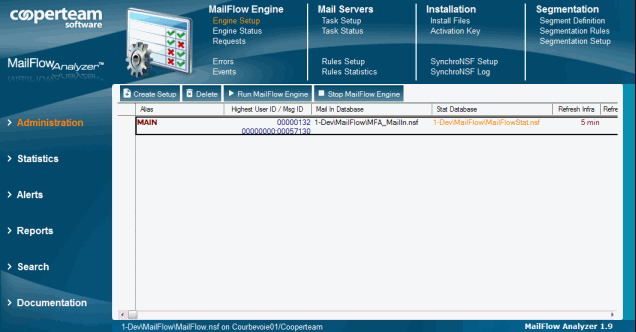
The 10 Notes databases that make up the Mail Flow Analyzer product (Configuration, Collect, Stat, Log, Search, Report, Server, User, Dashboard and Quarantine) are now directly accessible from the Configuration database through a unified interface (shown on image beside).
Just like what we had set up in our Desktop Manager tool (with the unified Desktop Manager database and Desktop Manager User) we integrated a navigation system in the configuration interface of Mail Flow Analyzer Multi-bases via the left-hand browser for the choice of themes (Configuration, Statistics, Alerts, Searches, Reports ...) and the contextualized views in the top browser.
Message Flow Control
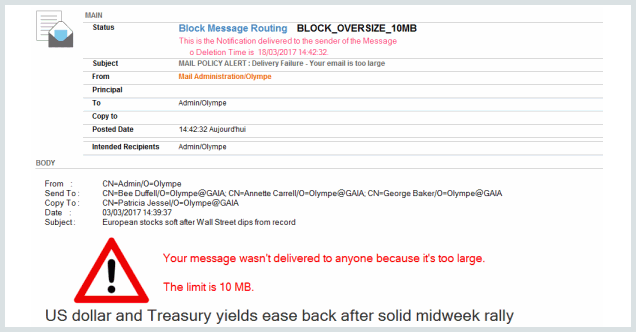
This is the highlight of this new version: it is now possible to regulate the flow of messages by blocking for example certain undesirable messages during their routing. A notification message is then sent to the sender of the blocked message for the reason. You can change the message routing through Mail rules, directly from the Mail Flow Collect databases installed on the mail servers (shown on image beside).
It is possible to permanently block messages (BLOCK_MESSAGE), hold them for a few hours on the server before releasing them (DELAY_MESSAGE), change the names of the recipients of the message (CHANGE_RECIPIENT) or the name of the sender (CHANGE_SENDER).
The right to disconnect

With Mail Flow Analyzer 1.9 you can now practice the new regulations regarding the right to disconnect users, especially those equipped with SmartPhone. The notion of Business Hours appears in the product at the level of the Setup document:
This functionality is then reflected in statistics, alerts, the search module, reports and messaging rules. It is thus possible to monitor and control messages sent outside working hours, which are of a nature To prejudice the right to disconnection of the employees of the company.
New statistics

We have added a statistic for messages to which the user is a primary recipient and statistics on sending messages from some known external SMTP servers.
Searches
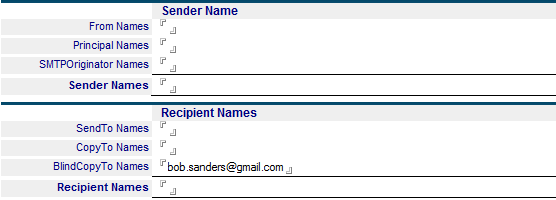
The search criteria have been refined, in particular in the search for the name of the sender or recipients by allowing a more precise selection of their use (main recipient, copy or hidden copy)
Reports
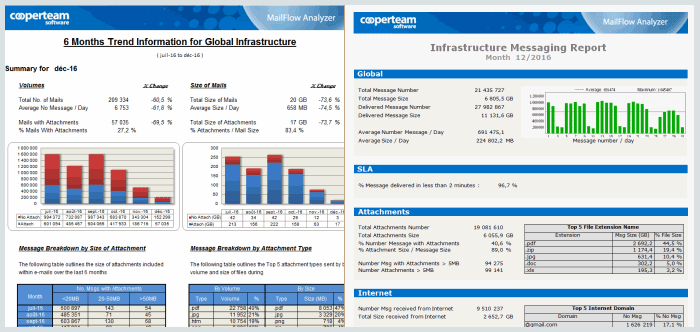
Report templates have been updated for a more enjoyable visual rendering And new report templates are emerging.
Dashboard
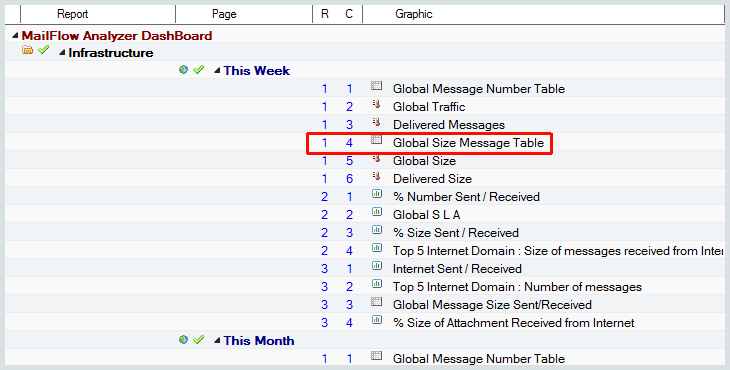
The configuration of the Dashboard database has been redesigned to simplify, among other things, the link between the setup documents and the Widgets displayed in the web page.
Documentation
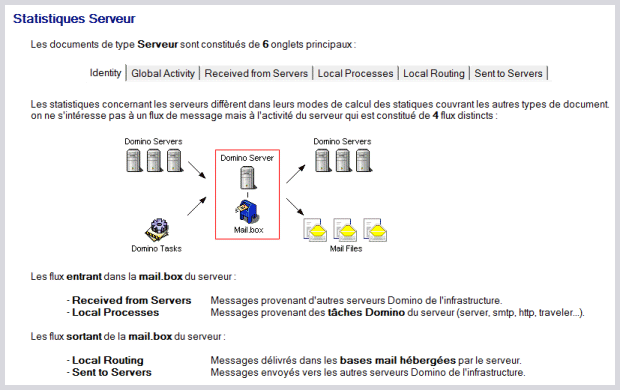
Finally, the documentation has been largely rewritten to include in particular detailed explanations on all the statistics produced by the tool.

Evaluate Mail Compliance Archiver
A COOPERTEAM consultant is available to present or arrange an evaluation of Mail Compliance Archiver by filling out the contact form.
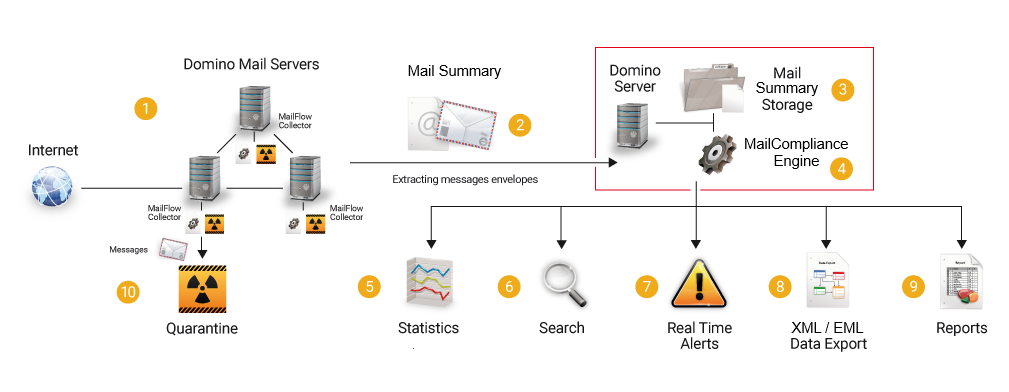
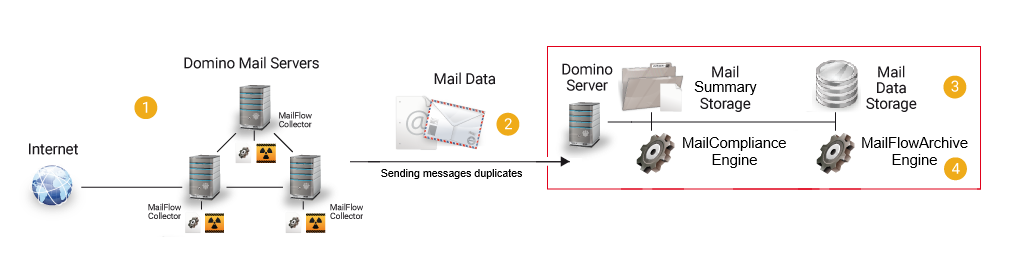
 The data from the messages (Mail Summary Data) is collected directly on the Mail servers.
 Message data is sent regularly to the machine hosting the processing engine.
 Message data is stored on the processing machine and kept for the long term (up to several years).
 The processing engine (MailCompliance.exe) processes message data to provide all services:
 Statistics are generated in real time. They cover the overall infrastructure, alerts, archived messages...
 The multi-criteria search module allows access to data from all messages that have circulated in the infrastructure.
 Alerts are raised in real time based on anomalies detected in the message flow.
 All data related to message flows can be exported as XML files (for external statistical processing) or in EML format.
 All statistics are available in the form of Reports (Word / Excel files) or via a Web Dashboard.
 Messaging rules are applied in real time to messages passing through Domino servers. Any message posing a risk to the infrastructure is immediately directed to a Quarantine database.